 |
| By Mark Gough |
When was the last time you actually read an email — carefully, thoroughly — before you clicked through the links inside?
If you're like most people, it’s been a while.
Most just check the sender, skim the content and move on. Maybe they click the link inside, maybe they don’t.
Either way, most people typically don’t spend more than three seconds thinking about a single email.
And that’s the problem. Because it’s exactly what scammers are counting on right now.
A New Era of Digital Danger
Most scam emails are obvious if you're paying attention. The typical red flags include …
- Spelling mistakes,
- Strange sender addresses,
- And clunky grammar.
You've trained yourself to spot these over the years.
But scammers know that. So, they’ve evolved. And the latest campaign doesn't give you any of the tried-and-true signals of fraud.
There are no misspelled word to catch. No weird domain to squint at.
And now, one of these sophisticated phishing campaigns is making the rounds. And it’s specifically targeting crypto users.
The hook is simple: Emails that appear to be legitimate Google security notifications.
We're talking language that mirrors what a real "recovery contact request" or "review request" Google alert says. And in some cases, the messages appear to originate from real Google systems. Not a spoofed address. Not a dodgy lookalike domain.
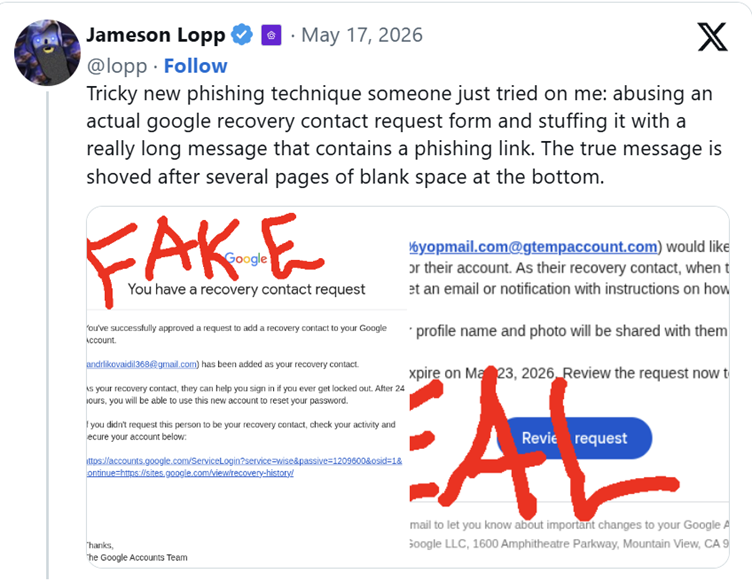
That’s how sophisticated hackers are today. They can trick you with real Google infrastructure, abused and pointed directly at you.
That's what makes this one different from the phishing emails you're used to ignoring.
The email arrives, it looks right, and your brain files it under "legitimate" before you've had a chance to think twice.
The technical trick behind it is almost elegant. Attackers embed large blank spaces and hidden formatting inside the email body to push malicious links well below the visible area of the message.
This means the top of the email looks completely normal. But the payload sits quietly below the fold, waiting for you to scroll down and click through the wrong link without reading further.
By the time you realize something is wrong, you may have already handed over everything the attacker needs.
Why Target Crypto Users?
The answer is straightforward: The payoff is bigger, and the recovery options are worse.
A phishing attack against a regular bank account is serious. But banks have fraud departments, reversal mechanisms and regulatory obligations to help customers recover funds.
Outside of a few specific instances with centralized exchanges, crypto has none of that.
Once a transaction leaves your wallet, it is gone. The blockchain doesn't care about intent. There is no dispute process. There is no phone number to call.
For an attacker, that asymmetry is the whole point. A convincing fake login page can capture …
- Your password,
- Session cookies,
- And two-factor authentication codes
All in a single interaction.
With just those three things, an attacker can access to your exchange account and initiate withdrawals within minutes. And if your wallet's seed phrase is stored anywhere that becomes accessible after a login compromise, the damage can extend beyond a single account.
The speed matters, too.
Crypto moves fast by design. What takes a bank three to five business days to process can happen on-chain in under a minute.
Which means by the time you notice something is wrong, the window to do anything about it has already closed.
How to Spot It Before It Gets You
As I said, the old signals won’t help you spot this type of attack. Instead, here are three new red flags to keep on your radar …
Urgency is a manipulation tactic, not a security feature. Real Google security alerts don't pressure you to act immediately.
If an email — even one that looks legitimate — tells you that you have minutes to respond or that your account will be locked, slow down. That pressure is the attack.
The only solution presented is to click an embedded link. Google will not ask you to click a link in an email to secure your account.
If something genuinely needs your attention, you will find it inside your account settings when you navigate there directly. The email is never the right starting point.
The visible text looks clean, but there's unusual blank space in the body. Before you click anything, scroll all the way down. Hidden content pushed below the fold is a deliberate tactic.
If the email has large gaps or areas that seem oddly empty, treat that as a warning sign.
The email arrived without you doing anything. An unsolicited notification is almost always a threat, not a courtesy. Ask yourself what action of yours could have triggered that email. If the answer is nothing, don't engage with it.
The language is generic rather than specific. Legitimate security emails from services you use will usually reference your username or the specific action that triggered the alert.
Vague language designed to apply to anyone is a sign the message wasn't generated by the platform that supposedly sent it.
These are all useful tricks to keep in mind. But ultimately, there’s only one rule that matters …
Never click a link inside a security email, no matter how real it looks.
If you receive an alert claiming to be from Google, open a new browser tab and navigate directly to myaccount.google.com.
If it's supposedly from your exchange, open the app or navigate to the page yourself.
The email, regardless of how legitimate it appears, should be treated as untrusted by default every single time.
Pause before you click. It takes 30 seconds.
But this simple move will be your best line of defense.
Best,
Mark Gough